
Need a website that does more than look good? A slow website, manual business tasks, or limited features can hold your business back. That’s where Laravel development in South Africa can help.
Laravel is a PHP framework for building secure, scalable web applications, from custom business tools and online stores to booking systems and APIs. It offers built-in tools for routing, database management, authentication, and testing, helping developers build and maintain applications with less repetitive code. But is Laravel right for your project?
This guide covers when to use it, its benefits and limits, local business considerations, and how to get started.

What Is Laravel Development? And How Does It Work?
Laravel is an open-source PHP framework for building web applications. Laravel development is the process of creating, testing, and maintaining these applications using tools for routing, databases, security, and user requests.
Laravel works by connecting different parts of an application so they work together smoothly.
- Routes: Direct website requests to the right page or function.
- Controllers: Handle requests, apply business rules, and return responses.
- Models and databases: Use Eloquent ORM to manage data in MySQL, PostgreSQL, or SQLite.
- Views: Display information through Blade templates and user-friendly page layouts.
- Security and testing: Support authentication, input validation, access control, and automated tests.
- Deployment and maintenance: A Laravel development company can configure hosting, connect APIs, monitor performance, and update the application.
What Makes Laravel Different from Plain PHP?
Laravel adds structure and ready-made tools to PHP, helping developers build secure, maintainable web applications with less repetitive code.
| Feature | Plain PHP | Laravel |
|---|---|---|
| Code structure | Developers organise files and logic themselves. | Uses a clear MVC structure: Models, Views, and Controllers. |
| Routing | Developers often write custom URL-handling logic. | Provides built-in routing for web pages and API endpoints. |
| Database management | Often requires manual SQL queries or extra libraries. | Eloquent ORM simplifies database operations and relationships. |
| Security | Developers must implement protections carefully. | Offers tools for CSRF protection, password hashing, and input validation. |
| Authentication | Login and access control need custom code or libraries. | Supports authentication tools and authorisation policies. |
| Reusable features | Developers build or connect tools as needed. | Includes features for caching, queues, email, and database migrations. |
| Testing and maintenance | Depends on the project's structure and chosen tools. | Supports automated testing and organised application development. |
| Best use case | Small scripts and simple tasks with limited requirements. | Complex websites, business applications, e-commerce platforms, and APIs. |
When Should You Use Laravel in South Africa?
Laravel suits South African businesses that need secure, custom web applications with flexible features, database support, and room to grow.
Custom Business Applications
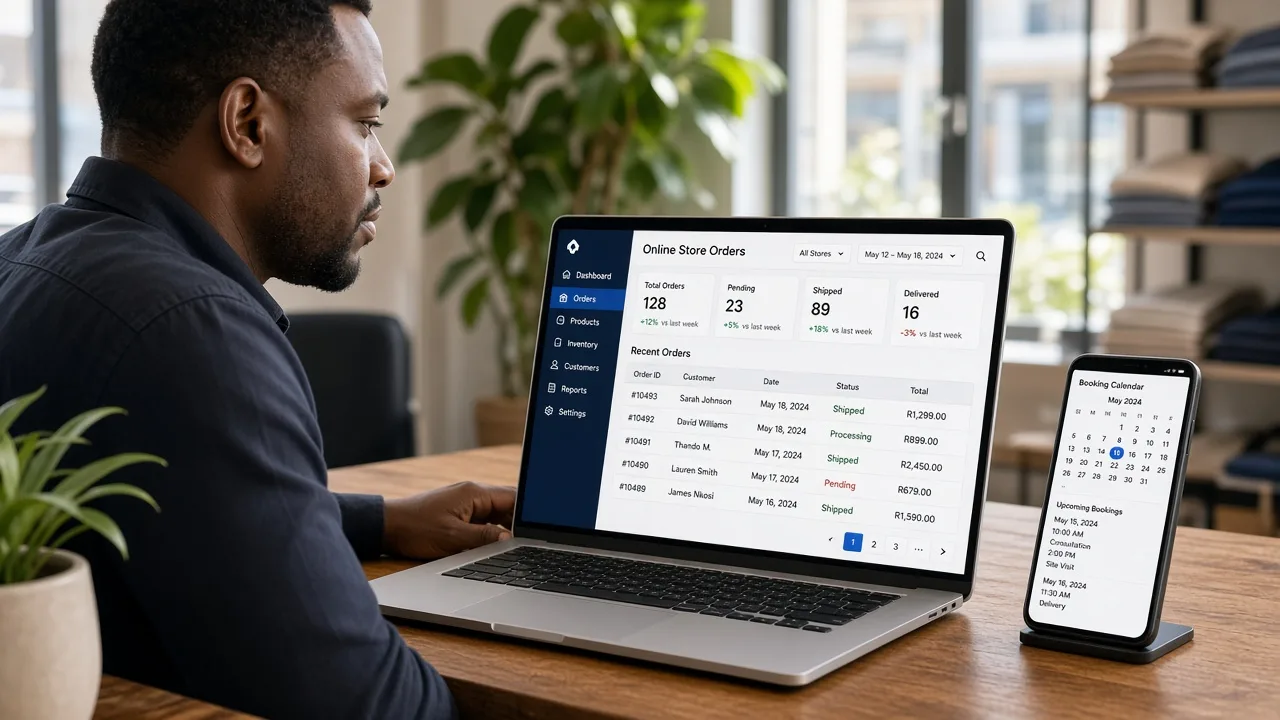
Use Laravel to build staff portals, inventory systems, customer dashboards, and workflow tools. Its PHP framework, database models, and role-based access controls help manage business tasks in one place.
E-commerce Websites and Online Marketplaces
Laravel works well for online stores with custom pricing, product filters, seller accounts, and order tracking. It can also connect payment gateways and stock systems to support local business needs.
Booking and Appointment Systems
Choose Laravel for booking platforms that manage schedules, availability, reminders, cancellations, and customer records. It suits clinics, consultants, service businesses, and venues with specific booking rules.
API-Driven Applications
Laravel helps build REST APIs that connect mobile apps, websites, payment services, and third-party systems. Built-in routing, request validation, and authentication tools help developers manage data exchange.
MVPs and Startup Products
Laravel can help startups launch a minimum viable product (MVP) without building every feature from scratch. Its reusable tools support faster testing, feedback, and future changes as the product grows.
When Laravel May Be Overkill
A simple brochure site or basic blog may not need a custom framework. For straightforward website development in South Africa, WordPress or a website builder may cost less and be easier to manage.
When Laravel Might Not Be the Right Choice
Laravel is powerful, but it isn’t the best fit for every project. The right choice depends on your budget, technical needs, website features, and long-term maintenance plans.
- Simple websites: WordPress or website builders may suit basic blogs and brochure sites better.
- Tight budgets: Laravel projects may cost more when custom development, testing, and hosting are required.
- Quick online stores: Shopify can be simpler for businesses needing standard e-commerce features.
- Limited PHP skills: Laravel requires knowledge of PHP, Composer, databases, and framework tools.
- Small, one-off scripts: Plain PHP may be enough for simple tasks with few features.
- Existing platform constraints: If your business relies on tools that integrate poorly with Laravel, another framework may reduce development work.
Questions to Ask Before Choosing a Framework
Before choosing Laravel, think about your budget, project needs, technical skills, and plans for future growth.
- What do I need to build: a simple website, an online store, or a custom web application?
- Does my project need features like user accounts, payment gateways, or third-party API integrations?
- Will Laravel fit my budget for development, hosting, updates, and maintenance?
- Can my team manage Laravel, or will I need help from a Laravel development company?
- Will the application handle more users and data as my business grows?
- Does the framework support my security, POPIA, and South African payment requirements?
Benefits and Limitations of Laravel for South African Businesses
Laravel offers South African businesses flexible web development tools, but its costs, learning curve, and maintenance needs deserve a closer look.
1. Faster Development with Built-In Tools
Laravel includes tools for routing, database management, authentication, and testing. Developers can build business portals and booking systems without writing every feature from scratch.
2. Flexible and Scalable Applications
From customer dashboards to online marketplaces, Laravel supports custom features as business needs change. Good code structure and suitable hosting help applications handle growth.
3. Strong Security Features
Laravel provides tools for input validation, password hashing, and protection against common web attacks. Developers must still configure access controls, update dependencies, and test the application.
4. Easy Integration with Business Services
Laravel can connect with payment gateways, email platforms, accounting software, and REST APIs. South African businesses can use these integrations to link online payments and daily workflows.
5. Development and Maintenance Costs
Custom features, testing, hosting, and ongoing support affect the total budget. Review the web app development cost in South Africa before choosing Laravel, and plan for future updates.
6. Learning Curve and Technical Support
Laravel requires knowledge of PHP, databases, Composer, and framework tools. Businesses may need skilled developers for bug fixes, security updates, and long-term support, adding to ongoing costs.
What Should You Consider Before Starting a Laravel Project in South Africa?
Plan your Laravel project around local payments, data privacy, hosting, and business needs to avoid costly changes after launch.

Payment and Third-Party Integrations
- Support local payment gateways like PayFast or Peach Payments, plus EFT options and secure payment processing.
- Check API compatibility with accounting software, email services, CRM systems, and inventory tools.
POPIA and Personal Information
- Follow POPIA requirements for collecting, storing, processing, and protecting customer information.
- Add access controls, secure data storage, clear privacy notices, and suitable data breach procedures.
For a deeper look at privacy duties, see our guide to POPIA compliance for app developers.
Hosting, Performance, and Maintenance
- Choose reliable hosting with SSL certificates, regular backups, monitoring, and room to scale.
- Plan for Laravel updates, database optimisation, security patches, and ongoing technical support.
Local Business Requirements
- Consider South African Rand (ZAR), local tax needs, mobile users, and regional customer support.
- Check business workflows, connectivity limits, and integration needs before finalising the application scope.
How to Get Started with Laravel Development
Start with PHP basics, set up the right tools, and build a small project. You can then add features, test your code, and prepare it for launch.

Step 1: Learn the PHP Fundamentals
Before using Laravel, learn the basics of PHP. You don’t need to know everything, but you should understand how websites process information and respond to user actions.
Focus on these core skills:
- Variables, arrays, and functions: Store information and reuse code.
- Conditions and loops: Make decisions and repeat tasks.
- Classes and objects: Understand the basics of object-oriented programming (OOP).
- HTML, CSS, and JavaScript: Build page layouts and interactive features.
- HTTP requests and responses: Learn how browsers and web servers communicate.
These skills make Laravel’s routes, controllers, and models much easier to understand.
Step 2: Install the Required Tools
Set up a local development environment so you can build and test your application on your computer before publishing it.
You’ll generally need:
- PHP: Runs Laravel applications.
- Composer: Installs PHP packages and manages dependencies.
- Laravel installer: Helps create new Laravel projects.
- Node.js and npm: Build frontend assets when your project needs them.
- Code editor: Use a tool such as Visual Studio Code to write and manage code.
- Database: Choose MySQL, PostgreSQL, SQLite, or another supported option based on your project.
Step 3: Create Your First Laravel Project
Once your tools are ready, create a starter application. Open your terminal and run the commands below, following the current Laravel installation guide.
laravel new my-first-app

cd my-first-app

npm install && npm run build

composer run dev
The Laravel installer may ask you to choose a database, testing framework, or starter kit. Pick the options that suit your learning goals. The commands above assume the installer is available and your system meets the required setup.
When the development server starts, open the local address shown in your terminal. You should see your new Laravel application running.
Step 4: Learn Routes, Controllers, Views, and Models
These four parts help you understand how a Laravel application works. Try changing one small feature at a time instead of building the whole app at once.
- Routes: Define which code handles a URL, such as /customers.
- Controllers: Process requests and decide what response to return.
- Views: Display pages using Blade templates.
- Models: Represent database records and help manage data through Laravel’s Eloquent ORM.
Here’s the basic flow:
User visits a page → Route: matches the request → Controller: handles the task → Model and database: manage data when needed → View or response: returns the result
For example, a customer page might use a route to call a controller, retrieve customer records through a model, and display them in a Blade view.
Step 5: Connect a Database and Build CRUD Features
Build a small customer-management app to practise working with real data. Start with a database such as MySQL or SQLite, then learn how Laravel connects your application to it.
CRUD stands for four basic actions:
- Create: Add a new customer.
- Read: View customer details.
- Update: Edit a phone number or email address.
- Delete: Remove a record when permitted.
Use database migrations to create or change tables, Eloquent models to work with records, and validation to check submitted information before saving it.
For instance, if a user enters an invalid email address, validation should flag the problem instead of saving incorrect data. Test each CRUD action before moving on.
Step 6: Add Authentication and Security
If your application stores customer details or business records, security cannot be an afterthought. Laravel offers tools that help you build safer applications, but developers still need to configure and test them properly.
Focus on these areas:
- Login and registration: Use a suitable Laravel starter kit to add authentication features.
- Authorisation and roles: Control which users can view, edit, or delete specific records.
- Input validation: Check form data before processing it.
- Secure configuration: Keep passwords and API keys out of public code, and protect environment settings.
- Dependency updates: Keep Laravel and third-party packages supported and up to date.
- Automated testing: Test important features, permissions, and common failure cases.
For South African projects, also consider POPIA when handling personal information. A secure login alone does not make an application compliant.
Step 7: Deploy and Maintain the Application
Your app may work perfectly on your computer, but going live takes a little more preparation. Choose hosting that supports your Laravel and PHP versions, database, storage, and expected traffic.
Before launch, check these tasks:
- Production configuration: Set environment variables securely and configure the production database.
- Database migrations: Apply required schema changes carefully.
- HTTPS: Set up a valid SSL/TLS certificate to protect data in transit.
- Backups: Schedule backups and test that you can restore them.
- Monitoring: Track errors, uptime, and performance.
- Maintenance: Apply security updates, check logs, and fix bugs.
Common Laravel Development Mistakes to Avoid
Small coding mistakes can lead to security risks, slow performance, and costly fixes. Avoid these common errors to keep your Laravel project reliable and easier to maintain.
- Skipping project planning: Define your features, budget, timeline, and business goals before coding.
- Ignoring security: Use input validation, access controls, secure authentication, and regular updates.
- Writing messy code: Follow Laravel conventions and use reusable code to simplify future changes.
- Neglecting database design: Plan database tables, relationships, indexes, and migrations before adding large amounts of data.
- Choosing poor hosting: Match server resources, PHP versions, and database support to your app’s needs.
- Underestimating costs: Review Laravel development cost in South Africa, including testing, hosting, updates, and support.
- Skipping testing and backups: Test key features and schedule backups to reduce downtime and data loss.
Frequently Asked Questions About Laravel Development in South Africa
1. What is Laravel used for?
Laravel is a PHP framework used to build web applications, online stores, booking systems, customer portals, and custom business software.
2. Is Laravel good for South African businesses?
Yes. Laravel suits businesses that need custom features, database-driven systems, payment integrations, and room to grow.
3. Is Laravel better than plain PHP?
Laravel offers built-in tools for routing, security, database management, and testing. Plain PHP may suit small scripts with simple needs.
4. How much does Laravel development cost in South Africa?
Costs depend on project size, features, integrations, and developer rates. Include hosting, testing, maintenance, and future updates in your budget.
5. Is Laravel suitable for e-commerce websites?
Yes. Laravel can support product catalogues, stock management, customer accounts, order tracking, and payment gateway integrations.
6. Do I need to learn PHP before Laravel?
Yes. Knowing PHP basics, functions, classes, databases, and HTTP requests makes Laravel easier to learn and use.
7. Is Laravel secure for web applications?
Laravel provides security tools, but developers must configure authentication, validate inputs, manage access, update packages, and test the application.
8. How do I get started with Laravel development?
Learn PHP, install Composer and Laravel, create a small project, practise database operations, add security, and learn deployment basics.