

Still copying bank payments into Excel by hand?
Many South African teams do this every day. One typo and your books are wrong. One bad address and a parcel gets lost.
API integration for South African businesses fixes this. It lets your bank, courier, and ERP share data automatically. Orders, payments, and tracking are updated without manual work.
In this blog, you will learn how each connection works. You will also see the steps to build it, common problems, and how to pick the right approach.
- API integration connects banks, couriers, and ERPs so payments, deliveries, and inventory stay in sync without manual data entry.
- Bank feeds and payment gateways speed reconciliation, improve cash flow visibility, and cut password risk across multiple portals.
- Courier APIs generate waybills, return live rates, and push tracking events so customers stop asking where their parcel is.
- ERP links keep stock, invoices, and orders aligned with ecommerce stores such as WooCommerce, Shopify, and Takealot.
- Sandbox testing, idempotency, monitoring, and POPIA-aware access controls turn integrations into reliable long-term operations tools.

What Is API Integration for South African Businesses, and Why Does It Matter?
API integration connects two or more software systems through their APIs so they can share data automatically. A bank, courier, and ERP can then exchange orders, payments, and tracking updates without anyone ever retyping information or copying files by hand.
Think of an API as a waiter. You tell the waiter your order. The waiter takes it to the kitchen and brings back your food. You never walk into the kitchen yourself.
Here is why this matters for local companies.
- Load shedding and tight budgets mean teams cannot waste hours on repeat data entry.
- Bank transaction data flows into your accounting software, so you can reconcile payments in minutes, not days.
- Courier APIs create waybills and send tracking events, so customers stop asking where their parcel is.
- ERP integration keeps stock levels correct, so you stop selling items that are already gone.
- Automated workflows reduce typing mistakes that cause refunds, VAT errors, and unhappy customers.
- Strong access control and POPIA rules protect customer data when systems talk to each other.
Key Benefits of API Integration for SA Companies
Four clear gains show why more local teams now connect their banks, couriers, and ERP tools into one workflow.
Time Savings and Fewer Manual Errors
Manual data entry eats hours. It also invites mistakes. A wrong digit in an invoice can cost you a customer.
An API does the typing for you. It uses data validation to catch bad entries early. Your team can spend that saved time on sales and service.
Real-Time Data Across Finance, Logistics, and Sales
When systems share data, everyone sees the same numbers. Sales see up-to-date stock levels. Finance sees payment status. Logistics sees shipment status.
I once saw a team argue for a week over one missing order. The problem was two spreadsheets that did not match. One shared data source would have ended it in minutes.
Better Cash Flow Visibility
Late payments hurt small businesses. With automated bank feeds, you see money the moment it lands. Transaction matching ties each payment to the right invoice.
You also spot unpaid invoices faster. That helps you chase debt early. Healthy cash flow starts with clear numbers.
Scalability as Your Business Grows
Manual work breaks when order volume jumps. Ten orders a day is easy. Five hundred is a mess.
Integrated systems handle growth with less stress. Background jobs process orders while your team sleeps. You add new couriers or banks without rebuilding everything.
Bank API Integration in South Africa
Bank APIs let your software read account data and, in some cases, start payments. Support differs by bank, so always check the official developer pages.
Popular South African Bank APIs
FNB, Standard Bank, Nedbank, Absa, and Capitec all serve millions of local customers. Each bank offers different digital tools and different levels of API access.
Some offer a full developer portal. Others work through partners or accounting software bank feeds. Start by asking your bank what it supports for business accounts.
The Nedbank API Marketplace is a good primary source to study. Its official documentation explains banking APIs, OAuth 2.0, and business transaction use cases.

Use Cases for Automated Reconciliation, Payments, and Balance Checks
Reconciliation is the top use case. Your system pulls transaction data and matches it to invoices. Fees and refunds get flagged for review.
Payments are next. Some APIs let you start payments from your own software. PayShap, run with support from the South African Reserve Bank, is worth watching for fast payments.
Balance checks are the simple win. Your finance team sees live balances without logging into three portals. Fewer logins also mean fewer password risks.
Payment Gateways to Consider
Many online stores use a payment gateway instead of a direct bank link. Popular local choices include PayFast, Ozow, Peach Payments, and Stitch.
Each one sends a payment status to your store. Your system reads it and marks the order paid, failed, or pending. Settlement records then help with reconciliation.
One mistake I have seen often is trusting the customer's browser. Always confirm the payment through the gateway's server message. Never trust a thank you page alone.
Security and Compliance
Bank data is sensitive. POPIA requires you to protect personal information with proper security safeguards.
If you take card payments, PCI DSS rules also apply. Most gateways handle card data for you. That keeps card numbers off your servers.
Use encryption in transit, least privilege access, and credential rotation. Store API keys in a safe place. Never paste them into shared chats.
Courier API Integration for Faster, Smarter Delivery
Courier integration turns shipping from a daily chore into an automatic step. Your store books the parcel and tracks it for you.
Leading South African Courier APIs
Many local carriers offer APIs. These include The Courier Guy, Aramex, DSV, Fastway, RAM, and Pargo. Each has its own coverage, pricing, and rules.
The Courier Guy shares business integration details on its official site. Its information covers API documentation and sandbox testing. Test in the sandbox before you ship real parcels.
Do not pick a courier on price alone. Check delivery areas, parcel size limits, and support quality. A cheap rate means little if parcels arrive late.
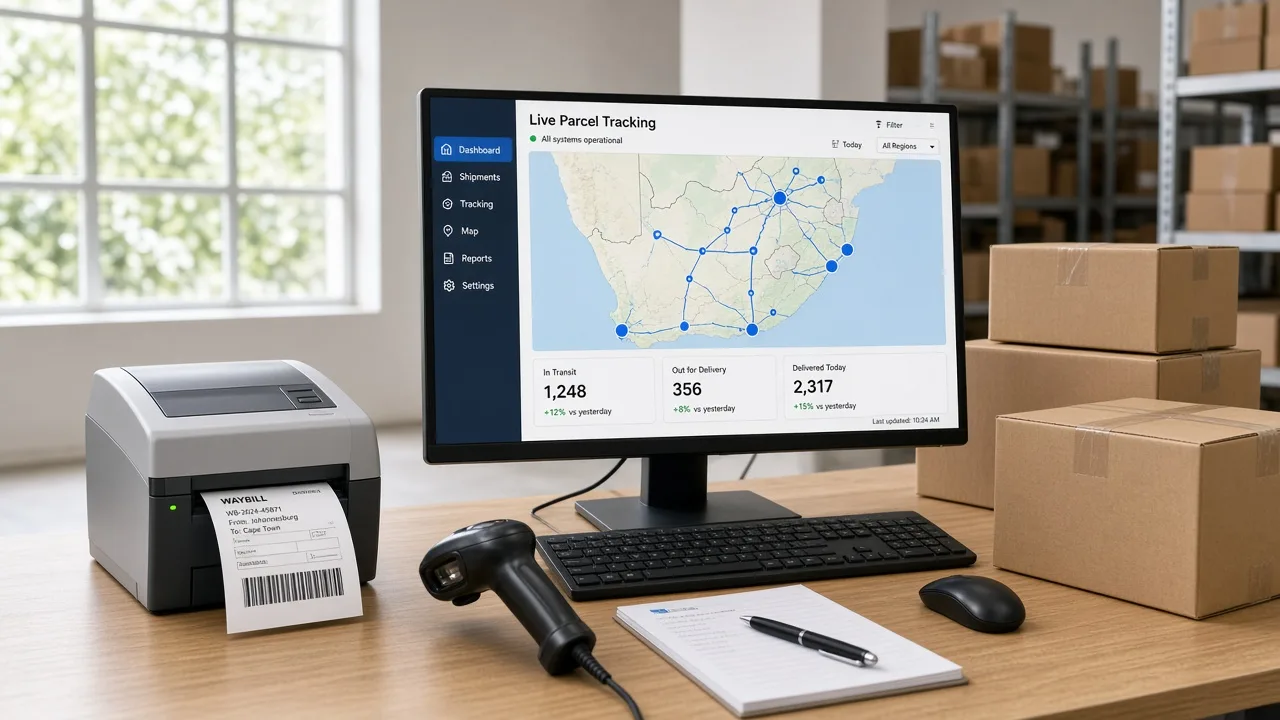
Live Rate Quotes, Waybill Generation, and Tracking
A live rate quote asks the courier for a price using parcel weight, parcel dimensions, and the delivery address. Your checkout page then shows the right shipping cost.
Waybill generation happens after the order is paid. The API creates the waybill and returns a label to print. This removes copy-and-paste work.
Tracking events flow back to your system. Each update, like collected or out for delivery, changes the order status. Proof of delivery can be stored too.
Aggregators Like Shiplogic and Bob Go
An aggregator connects you to many couriers through one API. Shiplogic and Bob Go are two names many local sellers know.
This saves time. You write one connection instead of five. You can also compare rates across couriers at checkout.
The trade-off is control. You depend on the aggregator's features and fees. Read the terms and check what data you can export.
Improving the Customer Delivery Experience
Customers want to know where their order is. Automatic tracking emails and SMS messages answer that question before they ask.
Accurate delivery status also cuts support tickets. Your team stops replying to "where is my parcel?" all day. That is a quiet but real cost saving.
Ready-made Plugin or Custom API Integration?
A ready-made plugin is enough when you ship from one store with one or two couriers. It is quick to install and often cheap.
Custom API integration helps when you have special rules. Maybe you use several warehouses, or your ERP must approve each shipment. Plugins rarely handle that well.
I once watched a retailer outgrow a plugin in six months. Rate rules got complicated, and orders slipped. Their fix was custom software development in South Africa built around their real process.
ERP Integration: Connecting Your Core Systems
Your ERP is the brain of the business. It holds orders, stock, invoices, and customer and supplier records. Bank and courier data must feed into it.
Common ERPs in South Africa
Local companies often use Sage, Xero, SAP Business One, Odoo, QuickBooks, or Microsoft Dynamics 365. Small teams lean toward Sage and Xero. Larger firms often pick SAP or Dynamics.
Sage and Xero both publish developer guides. The Sage accounting API docs describe JSON format, authentication, and request limits.
The Xero accounting API covers invoices and other accounting data.
Always verify each feature and API limit before you build. Plans differ. Limits change. A feature on one plan may be missing on another.

Syncing Orders, Invoices, and Inventory
Order sync sends each new sale into the ERP as a sales order. Invoice automation then creates the invoice and posts it to the general ledger.
Inventory synchronisation updates stock levels after every sale or return. This stops overselling. It also helps with purchase orders to suppliers.
Pick one source of truth for each type of data. For example, the ERP owns stock counts. The store only reads them. Two owners cause fights.
Integrating With Ecommerce Platforms
Most local online stores run on WooCommerce or Shopify. Many also sell on Takealot through the Takealot Seller API.
Each platform sends orders in its own format. Data mapping translates those fields into what your ERP expects. For example, "order total" in one system may be "gross amount" in another.
Map every field on paper first. I have seen teams skip this step and spend weeks fixing wrong VAT amounts. Ten minutes of planning saves days of cleanup.
How the Three Work Together: A Real-World Workflow Example
Let us see how API integration for South African businesses looks in daily life. The example below is fictional. The company, "Karoo Home Goods", is an imaginary online retailer in Cape Town.
A customer buys a kettle. Here is what happens behind the scenes.
| Step | System action | Check |
|---|---|---|
| 1 | The customer places the order. | The order ID is created. |
| 2 | The payment provider or bank sends a status update. | Payment status is verified. |
| 3 | ERP updates the order and stock record. | No duplicate order is made. |
| 4 | Courier shipment and waybill are created. | Address and parcel details are valid. |
| 5 | Tracking status updates in the store. | Failed updates can be retried. |
| 6 | Accounting records are reconciled. | Fees, refunds, and settlement gaps are handled. |
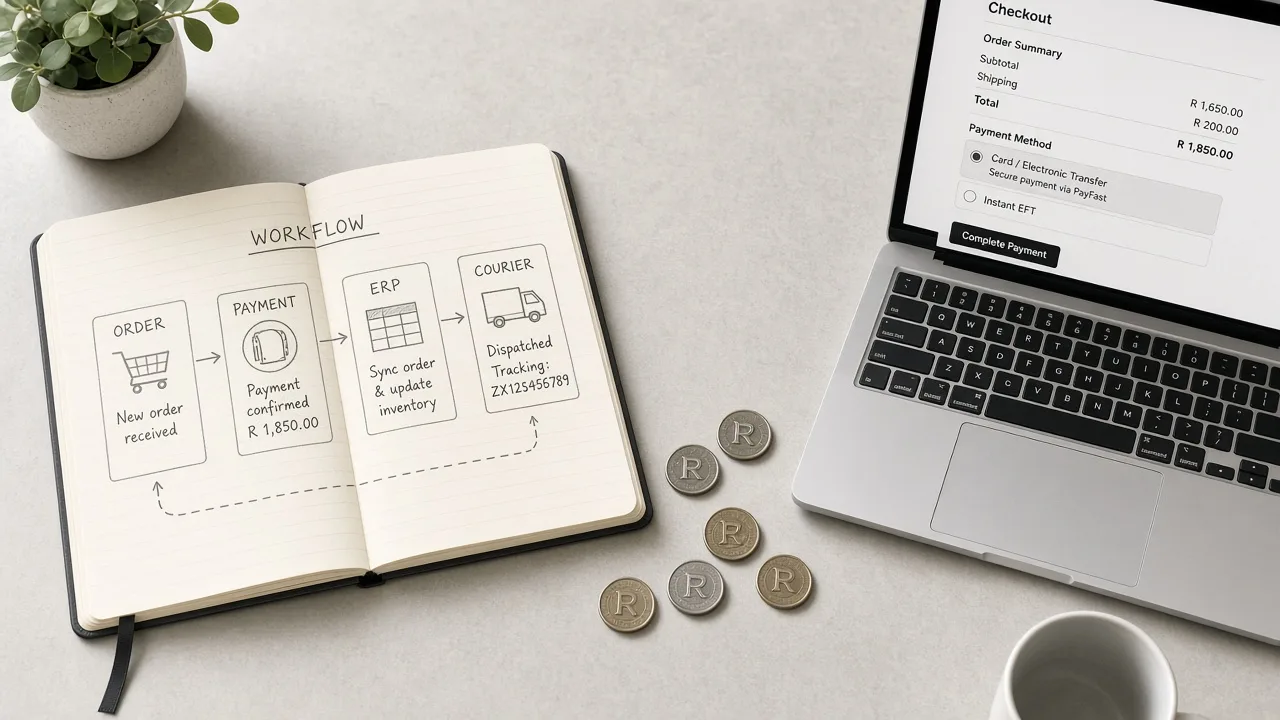
Not everything happens at the same speed. Some systems use webhooks. A webhook is a message that one system sends the moment something changes.
Others use scheduled polling or batch sync. Polling means your system asks, "Anything new?" every few minutes. Both work. Pick based on what each provider supports.
Idempotency is a big word with a simple idea. If the same message arrives twice, your system must act only once. Without it, one customer can get two orders and two parcels.
Add retry logic too. Networks fail. A good integration tries again later instead of losing the order.
Step-by-Step API Integration Process for South African Businesses
Follow these eight steps in order. Skipping one usually costs more time later.
1. Map Your Current Workflow
Write down how an order moves today. Note every tool, person, and handoff. Look for repeated typing and long waits.
This map shows where automation helps most. It also shows hidden steps people forget to mention.
2. Define the Business Problem and Success Metrics
Pick clear goals. For example, cut reconciliation time in half or reduce wrong shipments. Numbers keep the project honest.
Without a goal, you cannot tell if the integration worked. Measure before and after.
3. Check API Access, Vendor Support, and Existing Connectors
Read the API documentation for each system. Ask vendors about access, fees, and rate limits. Look for a ready connector before you build one.
Some providers need approval before you get live credentials. Plan for that wait.
4. Decide Data Mapping and Source of Truth
List each field and where it lives. Decide which system owns it. Plan data transformation, such as date formats or currency fields.
This is the step teams rush the most. It is also the step that causes the most bugs.
5. Plan Authentication, Permissions, and Error Handling
Choose API keys or OAuth 2.0 access tokens as the provider requires. Give each connection only the permissions it needs.
6. Test in a Sandbox or Staging Environment
Use test credentials and fake orders. Run integration testing and end-to-end testing. Try bad addresses, failed payments, and double messages.
Never test with real customer money. A sandbox exists so mistakes stay harmless.
7. Run a Pilot Launch With Reconciliation Checks
Start with a small share of orders. Compare results with your old process. Check that payments, stock, and shipments all match.
Fix issues while the volume is low. Then expand.
8. Set Up Monitoring, Alerts, and Maintenance
Keep API logs and audit trails. Set error alerts for failed synchronisation. Watch uptime and rate limits.
APIs change over time. Plan regular checks and updates. An integration is a living tool, not a one-time job.
Common API Integration Challenges and How to Fix Them
Even a small sync error can leave a South African business chasing missing orders or fixing payment records by hand. Here are six common API integration problems and practical ways to handle them.
1. Poor API Documentation
Challenge: Outdated API docs, unclear endpoints, and missing JSON examples can slow development and cause errors during bank, courier, or ERP integration.
Solution: Test REST API endpoints in Postman, review sandbox guides, and request sample payloads from the provider before building the connection.
2. Duplicate Orders or Payments
Challenge: Repeated webhooks or network timeouts can process the same order twice, leading to duplicate invoices, incorrect stock levels, or repeated refunds.
Solution: Use idempotency keys, event IDs, and duplicate checks. Log each transaction so retries cannot trigger the same action again.
3. Rate Limits and Timeouts
Challenge: Bank, courier, and ERP APIs may reject excess requests or time out during busy periods, delaying payment updates and shipment tracking.
Solution: Use request queues, exponential backoff, and background jobs. Follow API rate limits and retry failed requests without creating duplicate records.
4. Messy or Mismatched Data
Challenge: Different field names, date formats, VAT details, or product IDs can cause errors when orders move between e-commerce platforms and accounting software.
Solution: Create a data mapping sheet, validate required fields, and standardise formats before syncing records to your ERP or accounting system.
5. Security and POPIA Risks
Challenge: Exposed API keys, weak permissions, or unencrypted customer data can put personal information at risk under South Africa's POPIA requirements.
Solution: Encrypt data in transit, rotate credentials, and apply least-privilege access. An API development company in South Africa can help build secure API access and audit logging.
6. Silent Integration Failures
Challenge: A failed bank feed or courier update may go unnoticed for days, leaving payment records, stock counts, and delivery statuses out of sync.
Solution: Set up API monitoring, error alerts, and audit logs. Schedule daily reconciliation checks to catch missing transactions before they affect business operations.
How to Choose the Right Integration Approach
Your best option depends on budget, team skills, and how unusual your process is. Here is a simple way to decide.
Custom Development vs. Middleware
Middleware tools like Zapier, Make, and Workato let you connect apps with little code. They are fast to start. They suit simple flows and small teams.
Custom API integration gives you full control. It handles complex rules and heavy volume. It costs more upfront, but it can save money as you grow.
If you go custom, budget wisely. Compare quotes using this guide on full-stack development costs in South Africa. Also remember that API integration for South African businesses needs ongoing care after launch.
Questions to Ask Before You Start
- How many orders do we handle each day, and will that grow?
- Which systems must connect, and do native integrations already exist?
- Do we have special shipping, tax, or approval rules?
- Who will fix problems when a sync fails?
- How will we protect personal data under POPIA?
- What is our budget for build, testing, and monthly maintenance?
If most answers sound simple, start with a plugin or middleware. If they sound complicated, plan custom work.
Conclusion
API integration for South African businesses saves time, cuts errors, and gives you clear cash flow. Bank, courier, and ERP links work best when they share one source of truth.
Start small. Map your workflow, test in a sandbox, and watch your logs. Respect POPIA and keep credentials safe.
Pick the approach that fits your size today. You can always grow it later. Begin with one connection, and let the results guide your next step.
FAQs About Business System Integration in South Africa
1. How much does API integration cost in South Africa?
Costs depend on the number of systems, API access, and workflow complexity. A simple connector costs less than a custom multi-system integration.
2. How long does it take to integrate a bank, courier, and ERP?
A basic integration may take weeks, while a complex project can take several months. Testing, vendor approval, and data cleanup affect timing.
3. Is API integration suitable for small businesses?
Yes. Small businesses can start with one connection, such as payment reconciliation or courier tracking, then add more as order volumes grow.
4. Is API integration safe for South African businesses?
It can be safe with encrypted connections, secure credentials, access controls, monitoring, and proper handling of personal information under POPIA.
5. What is the difference between an API and a webhook?
An API lets one system request data or actions from another. A webhook sends an automatic message when a specific event occurs.
6. Can I connect Sage or Xero to a courier service?
Yes, if the required APIs or compatible connectors are available. You may need middleware or custom development to sync orders, invoices, and delivery updates.
7. Should I choose middleware or custom integration?
Middleware suits simple workflows and standard apps. Custom integration offers more control for complex business rules, multiple systems, and specialised reporting needs.
8. Who maintains an integration after launch?
Your internal IT team or development partner can monitor logs, fix errors, update API connections, manage credentials, and test changes when providers update their systems.