
Your HubSpot setup worked fine at the start. Then your team grew. Your process got messy. Now the standard tools feel too small for the job.
That is the real problem behind most searches for custom HubSpot development in South Africa.
This blog breaks down what custom development actually means, when your business needs it, what developers can build, how the process works, and how to pick the right partner. No fluff. Just what you need to know before you spend a rand on it.
What Is Custom HubSpot Development
Custom HubSpot development means building something extra on top of HubSpot. Something that the standard settings cannot do on their own.
Think of it like this. HubSpot out of the box is a strong CRM. It has contacts, deals, workflows, and reporting already built in.
But every business runs a little differently. Maybe your sales team follows a process that HubSpot was never designed around. Maybe you need to pull data from an old accounting system nobody wants to touch.
That is where custom HubSpot development comes in. Developers write code, build integrations, and shape the platform around your actual business, not the other way round. A specialist HubSpot development company in South Africa can help you decide what should stay native and what genuinely needs custom work.
According to Dataintelo's HubSpot implementation service market research, the global market was valued around 2.8 billion dollars in 2025 and is expected to reach roughly 6.4 billion dollars by 2034, growing at close to 9.8% a year.
Integration services alone made up about 28.6% of that market, which says a lot about how much businesses everywhere are leaning on outside expertise to get integrations right.
Benefits of Custom HubSpot Development for South African Businesses
Custom HubSpot development helps South African businesses streamline workflows, connect systems, improve data visibility, and scale efficiently.
- Better CRM fit. The system finally matches how your team actually works, not the other way round.
- Less manual work. Automation removes the repetitive tasks nobody enjoys doing anyway.
- Connected business data. Centralised customer data means fewer versions of the truth floating around.
- More accurate reporting. Data visibility improves once numbers come from one connected source.
- Scalable processes. Custom HubSpot solutions grow with the business instead of breaking under new demand.
- Better customer experience. Faster response times and personalisation tend to follow naturally once automation is in place.
- Higher team productivity. Less admin means more time for actual selling and service work.
- Greater control over business workflows. Custom logic gives you the exact rules your business needs, not a generic template.
If your HubSpot portal is only one piece of a wider systems picture, custom work often sits next to CRM development and custom software development in South Africa.
Custom HubSpot Development Solutions for South African Businesses
This is where things get practical. Here is what developers can actually build inside and around HubSpot.
Custom CRM Development
At the core of every project sits the data model. Objects, properties, associations, pipelines, and records. HubSpot describes objects, properties, and associations as the backbone of how data connects inside the CRM.
Custom CRM development means shaping these pieces around how your business actually operates, instead of forcing your process into a generic template.
Custom HubSpot Integrations
Most South African businesses run on more than one system. An accounting tool. Maybe an ERP. Sometimes a booking platform or a warehouse system.
Custom HubSpot integrations connect these tools so data flows both ways without someone retyping it every morning.
HubSpot API Development
The HubSpot CRM API and CMS API let outside systems talk to HubSpot directly. HubSpot's developer platform brings together APIs, developer projects, the HubSpot CLI, UI extensions, and app-building tools in one place.
HubSpot API development is usually the technical backbone behind any serious custom project.
Custom Workflow and Automation Development
Standard workflows handle a lot. But once you need custom actions, complex triggers, or conditional logic tied to outside data, you are in custom workflow development territory.
This covers things like automated lead routing, lead scoring rules, and business specific automation that native tools cannot quite reach.
Custom Objects and Data Models
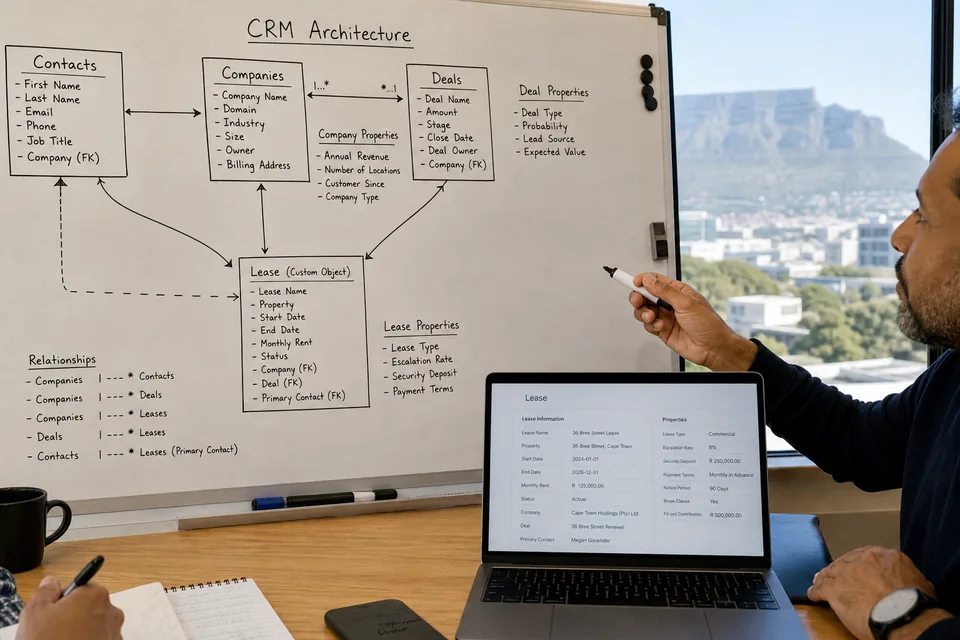
Sometimes your business just does not fit into contacts, companies, deals, and tickets. A property company might need a lease object. A clinic might need a patient record object.
Custom objects solve that. HubSpot's own documentation actually recommends checking whether an existing object can already handle the job before building a new one. That is good advice, and honestly, most developers who have been doing this a while will tell you the same thing before they even open a code editor.
UI Extensions and Custom App Pages
HubSpot's developer platform now supports UI extensions and app pages, some of them built with React. This lets developers add custom panels and tools directly inside the HubSpot interface your team already uses every day.
Webhooks and Real-Time Data Connections
Webhooks let HubSpot send instant updates to other systems the moment something changes. HubSpot's platform supports detailed webhook subscriptions alongside custom workflow actions, which makes real-time data synchronisation between systems much more reliable.
Custom CMS Development
For businesses using Content Hub, custom CMS development covers themes, custom modules, templates, and personalisation built with HubL and the CMS APIs. This is useful when your website needs a look and feel that templates just cannot give you. It often sits next to broader website development in South Africa.
Custom Reporting and Dashboards
Standard reports are fine until your business needs numbers pulled from several systems at once. Custom reporting connects the dots so leadership sees one clear picture instead of five different spreadsheets.
AI-Powered HubSpot Development
HubSpot's newer developer platform is clearly building toward AI, including agent tools and custom workflow actions tied into AI features like Breeze. For businesses ready for it, AI-connected CRM data can support smarter lead scoring and automated suggestions inside daily workflows.

Implementation Guide: How Custom HubSpot Development Works From Planning to Maintenance
You first understand how the business operates, then design the CRM architecture, build the required integrations and automation, test everything properly, and only then move into deployment and ongoing optimisation.
1. Start With Requirements and Business Goals
Before touching the HubSpot portal, define what the business actually needs to improve.
This means documenting sales processes, customer journeys, lead sources, existing CRM workflows, reporting requirements, integration needs, user roles, and the systems that currently hold customer data.
For example, a South African B2B company may want leads from its website, WhatsApp enquiries, and an external lead platform to enter HubSpot automatically. That sounds simple until you ask which system owns the customer record, how duplicates are handled, and when a lead should move between lifecycle stages.
Those details matter.
A proper discovery phase creates a clear requirements document and gives developers something much more useful than a list of requested features.
2. Map the CRM Data and Existing Processes
Once requirements are clear, map how information moves through the business.
Look at contacts, companies, deals, tickets, properties, associations, custom objects, pipelines, lifecycle stages, and reporting requirements. If external systems are involved, map those data fields too.
HubSpot's CRM data model is particularly important here because custom objects should solve a genuine data requirement rather than simply create another place to store information.
I have seen projects become unnecessarily complicated because teams jump into custom development before deciding what their CRM should actually represent. Fixing the data model later is painful and usually more expensive.
3. Design the Solution Architecture
Now the development team can decide what should be handled through native HubSpot functionality and what genuinely requires custom development.
The architecture may include HubSpot CRM, custom objects, workflows, APIs, webhooks, UI extensions, external databases, third party applications, or a custom backend.
This is also where authentication, API access, data synchronisation, error handling, scalability, and security should be considered.
Good architecture does not mean adding technology everywhere. Sometimes the best solution is the simpler one.
4. Configure the HubSpot Foundation
Before building custom functionality, configure the parts of HubSpot that already solve the requirement.
This can include CRM properties, pipelines, lifecycle stages, permissions, workflows, dashboards, views, forms, and standard automation.
Why build custom code for something HubSpot already handles well?
Using native functionality where possible keeps the implementation easier to maintain and reduces unnecessary technical debt.
5. Develop APIs and Custom Integrations
This is where the project becomes more technical.
Developers can connect HubSpot with ERP platforms, accounting systems, eCommerce platforms, internal applications, customer portals, or other business software using HubSpot APIs and webhooks.
The goal is not simply to move data from one system to another. The integration needs clear rules for data mapping, synchronisation, authentication, duplicate handling, failures, and retries.
For example, if an order is created in an eCommerce platform, the integration might update the related HubSpot contact and deal. If that request fails, the system should have a controlled way to detect and handle the problem rather than silently losing the update.
6. Build Custom CRM Features and Automation
Once the integration architecture is ready, developers can build the custom functionality identified during discovery.
Depending on the project, this might include custom objects, custom workflow actions, serverless functions, UI extensions, app pages, automated lead routing, custom reporting logic, or business-specific workflows.
HubSpot's developer platform supports APIs, UI extensions, app development, webhooks, and custom workflow actions, giving teams room to extend the platform when native functionality is not enough.
The important part is restraint. Custom code should support a clear business requirement.
7. Test the CRM, Integrations, and Workflows
Testing should happen before users depend on the new system.
Test individual functions first, then test the complete workflow from beginning to end. Check API responses, data mapping, permissions, duplicate records, workflow triggers, failed requests, notifications, reporting, and edge cases.
For integrations, test both successful and unsuccessful scenarios.
What happens if an external API is unavailable? What happens if a customer already exists? What happens when a required field is empty?
These boring questions are usually the ones that save a project later.
8. Complete Data Migration and Validation
If the project involves an existing CRM or spreadsheets, data migration needs its own process.
Clean duplicate contacts, standardise fields, map old data to HubSpot properties, validate records, and test the migration with a smaller dataset before moving everything.
After migration, compare record counts and important fields against the original source.
A migration is not finished just because the records appear inside HubSpot. The data needs to be accurate enough for sales, marketing, customer service, and reporting teams to trust it.
9. Run User Acceptance Testing
Technical testing is not the same as user acceptance testing.
Sales teams, marketers, customer service staff, and administrators should use the system in realistic scenarios before production deployment.
Ask them to complete actual tasks. Create a lead. Move a deal. Update a customer. Trigger an automation. Check a dashboard.
This often exposes small workflow problems that developers simply cannot see from a technical specification.
10. Deploy the Custom HubSpot Solution
Once testing and user acceptance are complete, the solution can move into production.
Deployment should be controlled rather than treated as a single switch.
Confirm permissions, integrations, authentication, workflows, data synchronisation, monitoring, and rollback procedures before users begin relying on the new functionality.
For larger implementations, a phased rollout can be safer than changing everything at once.
11. Monitor Performance After Launch
The first few weeks after deployment are important.
Monitor workflow errors, API activity, integration failures, data quality, user adoption, reporting accuracy, and system performance. A solution that worked perfectly during testing can still reveal unexpected behaviour once real users and real data enter the picture.
This is especially important for custom integrations because external systems can change independently of HubSpot.
12. Maintain and Optimise the HubSpot Environment
Custom HubSpot development does not really end on launch day.
Business processes change. APIs evolve. New HubSpot capabilities appear. Teams ask for new automation. Data requirements grow.
Ongoing maintenance can include API updates, workflow optimisation, security reviews, integration monitoring, bug fixes, performance improvements, documentation, and new feature development.
I usually look at maintenance as part of the original architecture rather than something added when problems appear. It keeps the CRM easier to scale and prevents small technical issues from becoming expensive rebuilds later. That is the same thinking behind a good enterprise software programme.
Custom HubSpot Development Use Cases Across South African Industries
Custom HubSpot development helps South African businesses adapt CRM workflows, integrations, automation, and data management to industry-specific needs.
| Industry | Custom HubSpot Development Use Case |
|---|---|
| Financial Services | Connect lead sources and qualification rules to route prospects to the right sales team automatically. |
| Real Estate and Property | Use custom objects to manage properties, leases, tenants, contacts, and deals in one CRM. |
| B2B SaaS | Connect billing and product data to HubSpot so usage patterns can improve lead scoring. |
| Professional Services | Build custom pipelines and task automation for longer sales cycles and relationship based client work. |
| eCommerce | Connect Shopify with HubSpot to sync customers, orders, carts, and marketing activity in real time. |
| Healthcare | Use custom objects and access controls to organise patient communication and sensitive business data. |
| Education | Automate enquiry, enrollment, and alumni workflows so admissions teams can follow up consistently. |
| Logistics and Distribution | Connect dispatch or fleet systems with HubSpot to update delivery status and customer records automatically. |
HubSpot Customisation vs Custom Development vs Integration
In real projects, these three usually work together. A business rarely needs only one. Most South African businesses end up combining native settings, some custom code, and one or two integrations to reach the setup they actually need.
| Approach | Best for | Technical effort |
|---|---|---|
| Native customization | Standard business requirements | Low |
| Custom development | Unique processes and functionality | Medium to high |
| Integration | Connecting external platforms | Medium to high |
South African Integration and Data Considerations
Local integration work often looks a little different here. Businesses need HubSpot connected to local accounting platforms, local payment systems, and sometimes WhatsApp for customer communication, since that is how a lot of South African customers actually prefer to talk to businesses.
ERP integration and customer portals come up a lot too, especially for B2B companies managing larger client accounts.
Data privacy matters here as well. POPIA affects how customer consent and data governance get handled inside any CRM project. This is not meant to be a full legal guide, but it is worth mentioning because data governance decisions get baked into the system early, not fixed later.
HubSpot Development Cost in South Africa
The cost of HubSpot development in South Africa can range from around ZAR 40,000 for a straightforward implementation to ZAR 1,000,000 or more for complex enterprise projects.
| Project Complexity | Typical Timeline | Estimated Cost |
|---|---|---|
| Basic | 2 to 5 weeks | ZAR 40,000 to ZAR 100,000 |
| Moderate | 5 to 10 weeks | ZAR 100,000 to ZAR 250,000 |
| Advanced | 10 to 16 weeks | ZAR 250,000 to ZAR 500,000 |
| Enterprise | 4 to 8 months | ZAR 500,000 to ZAR 1,000,000+ |
For a wider view of how custom builds are priced, see our guide to custom software development cost in South Africa.

Common Mistakes to Avoid in Custom HubSpot Development
Businesses often ask for custom automation when the real issue is actually messy CRM data underneath it. Fix the data first. The automation problem usually gets a lot smaller after that.
- Building before mapping the process. Jumping straight into development without understanding the actual workflow almost always creates rework.
- Customising everything. Not every problem needs custom code. Sometimes a native feature was sitting there the whole time.
- Ignoring existing HubSpot features. Teams sometimes rebuild something HubSpot already offers, just because nobody checked first.
- Poor data architecture. A weak data model causes problems for years after launch, not just at the start.
- Treating integrations as an afterthought. Integrations planned late in a project tend to be the most expensive part to fix.
- Skipping user acceptance testing. Systems that look fine on paper sometimes break the moment real users touch them.
- Ignoring API limits and platform changes. HubSpot's platform evolves. Projects that ignore this tend to age badly.
- Not planning for future scaling. A system built only for today's size struggles the moment the business grows.
How to Choose a HubSpot Development Partner in South Africa
This is usually the last decision before a project actually starts, and it matters more than most people expect.
Look for HubSpot development experience, API development capability, integration experience, CRM architecture knowledge, custom object experience, automation expertise, CMS development capability, a clear testing process, documentation, post-launch support, security awareness, and honest communication.
If your project involves custom APIs, CRM architecture, and several external systems, choosing the right HubSpot development company can genuinely make or break how smoothly the implementation goes.
Questions to Ask Before Hiring
- Have you built custom HubSpot integrations before?
- How do you approach CRM data architecture?
- Can you work with custom objects and APIs?
- How do you test integrations before going live?
- What happens if a HubSpot API or platform feature changes later?
Final Thoughts
Custom HubSpot development in South Africa is not really about adding fancy code for the sake of it. It is about making HubSpot actually fit the way your business runs.
Some businesses only need a small integration. Others need custom objects, workflow actions, and a proper data architecture rebuild. The right answer depends entirely on your own process, not on what worked for someone else.
If you are still figuring out whether custom HubSpot development in South Africa is the right move for your business, start with the discovery step. Map your process first. Everything else becomes a lot clearer after that.
Ready to scope the work? Explore custom HubSpot development services in South Africa.
FAQs
What is custom HubSpot development?
It means building extra features, integrations, or automation on top of HubSpot that standard settings cannot handle on their own.
When should a business choose custom HubSpot development instead of native features?
When the process is unique, data-heavy, or needs integrations, HubSpot does not offer it out of the box.
Can HubSpot integrate with custom business software?
Yes, through HubSpot APIs, webhooks, and custom API integration built by developers.
Can developers create custom objects in HubSpot?
Yes, custom objects let businesses store data that does not fit standard CRM objects like contacts or deals.
Can HubSpot developers build custom workflows?
Yes, custom workflow actions can trigger complex logic that native workflows cannot handle alone.
Can HubSpot be integrated with ERP systems?
Yes, ERP integration is one of the more common custom development projects for larger businesses.
Is custom HubSpot development suitable for small businesses in South Africa?
Sometimes. Smaller businesses often only need a few targeted integrations rather than a full custom build, so it depends on the actual process.